Math
Float
Float Constant
A floating point constant.
Float Connector
The Float Connector node serves no purpose other than to extend Float connections in your node graph for a simpler layout.
-x
Negate x
x*y
Multiply x and y
- Build a living shader (about an hour and a half): Start lesson · Follow the coach
- Make a jamming sphere (about 55 minutes): Start lesson · Follow the coach
- What a shader is (about 30 minutes): Start lesson · Follow the coach
x+y
Add x and y
- Corners and pixels (about 35 minutes): Start lesson · Follow the coach
- Ripples that catch the light (about 30 minutes): Start lesson · Follow the coach
- Noise without memory (about 30 minutes): Start lesson · Follow the coach
x-y
Subtract y from x
- Patterns from position (about 35 minutes): Start lesson · Follow the coach
- Click and key effects (about 30 minutes): Start lesson · Follow the coach
- A cloud of particles (about 40 minutes): Start lesson · Follow the coach
x/y
Divide x by y
abs(x)
Absolute value of x
- Noise without memory (about 30 minutes): Start lesson · Follow the coach
- A cloud of particles (about 40 minutes): Start lesson · Follow the coach
pow(x,y)
x to the power of y
mod(x, m)
x modulo m
fract(x)
Return the fractal of x (the decimals)
- What a shader is (about 30 minutes): Start lesson · Follow the coach
- Patterns from position (about 35 minutes): Start lesson · Follow the coach
- A cloud of particles (about 40 minutes): Start lesson · Follow the coach
x<y
1.0 if x is smaller than y, otherwise 0.0
max(x,y)
The larger of x and y
min(x,y)
The smaller of x and y
abs(x-y)
The distance between x and y (always a positive number)
sin(x)
Sinus of x
- Ripples that catch the light (about 30 minutes): Start lesson · Follow the coach
Integer Constant
An integer constant.
Integer Connector
The Integer Connector node serves no purpose other than to extend Integer connections in your node graph for a simpler layout.
Int→Float
Converts the integer number x to a floating point number
- Make it respond to you (about 40 minutes): Start lesson · Follow the coach
- Click and key effects (about 30 minutes): Start lesson · Follow the coach
- See the numbers: debug with Print Number (about 30 minutes): Start lesson · Follow the coach
Float→Int
Converts the floating-point number x to an integer by dropping the fractional part.
- Color you can control (about 35 minutes): Start lesson · Follow the coach
Clamp Range
The Clamp Range node calculates offset + x * factor, clamped by minValue and maxValue (if offset + x * factor is less than minValue, it will return minValue, and if it’s larger than maxValue, it will return maxValue).
Mod Range
The Mod Range node calculates: (offset + x * factor - minValue) modulo maxValue, and returns result + minValue. This keeps the value in the range minValue - (minValue + maxValue), by letting it wrap around.
Step
The Step node implements a binary threshold function that returns 0.0 or 1.0 based on a simple comparison. If x < edge, it will return 0.0; if x is larger than or equal to edge, it will return 1.0.
- Corners and pixels (about 35 minutes): Start lesson · Follow the coach
- Patterns from position (about 35 minutes): Start lesson · Follow the coach
- See the sound (about 40 minutes): Start lesson · Follow the coach
Smooth Step
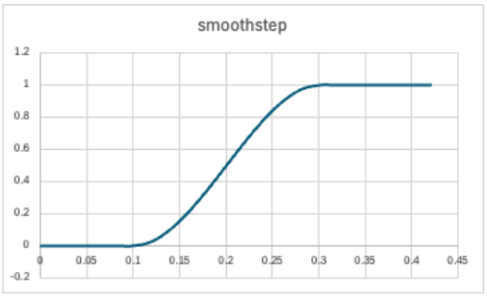
The Smooth Step node calculates:
- 0.0 if x <= edge1
- 1.0 if x >= edge2
- a smooth transition between 0 and 1 when edge1 < x < edge2
It uses cubic Hermite interpolation to create a smooth S-curve between 0.0 and 1.0.
In the example below edge1 = 0.1, and edge2 = 0.3
- Patterns from position (about 35 minutes): Start lesson · Follow the coach
- Click and key effects (about 30 minutes): Start lesson · Follow the coach
random(uv)
Returns a random number in the range [-1,1]. For every uv value, the result is independently random.
- Noise without memory (about 30 minutes): Start lesson · Follow the coach
random(xyz)
Returns a random number in the range [-1,1]. For every xyz (position) value, the result is independently random.
- A cloud of particles (about 40 minutes): Start lesson · Follow the coach
- Living splats (about an hour and a half): Start lesson · Follow the coach
random(xyz, t)
Returns a random number in the range [-1,1]. For every xyz (position) and t (time) value, the result is independently random.
Float Expressions
With Float Expressions you can express complicated math calculations in one node, rather than building them using simple individual nodes (which could make your node graph complex). A Float Expression node take one or more float inputs, and returns one float output.
The Float Expression is executed by the GPU, so it must adhere to the OpenGL Shading Language (GLSL). The only difference is that for convenience, all integer values in your expressions will be turned into floating-point values by adding “.0” at the end, as this is required by GLSL for floating-point calculations.
f(x)→Float
This node takes one floating point value as input and outputs the floating point result of a calculation. Example: x*2+1
- Say it in one node: function nodes (about 30 minutes): Start lesson · Follow the coach
- Color you can control (about 35 minutes): Start lesson · Follow the coach
- Living splats (about an hour and a half): Start lesson · Follow the coach
f(x,y)→Float
This node takes two floating point values as input and outputs the floating point result of a mathematical calculation. Example: x*y+y
- Say it in one node: function nodes (about 30 minutes): Start lesson · Follow the coach
- Remember the last frame (about 40 minutes): Start lesson · Follow the coach
- Living splats (about an hour and a half): Start lesson · Follow the coach
f(x,y,z)→Float
This node takes three floating point values as input and outputs the floating point result of a mathematical calculation. Example: x+y+z/2
- Say it in one node: function nodes (about 30 minutes): Start lesson · Follow the coach
f(w,x,y,z)→Float
This node takes four floating point values as input and outputs the floating point result of a mathematical calculation. Example: mod(x+y+z/2,w)
f(v,w,x,y,z)→Float
This node takes five floating point values as input and outputs the floating point result of a mathematical calculation. Example: v*mod(x+y+z/2,w)
Int Expressions
f(x)→Int
This node takes one integer value as input and outputs the integer result of a calculation. Example: x*2+1
f(x,y)→Int
This node takes two integer values as input and outputs the integer result of a mathematical calculation. Example: x*y+y
f(x,y,z)→Int
This node takes three integer values as input and outputs the integer result of a mathematical calculation. Example: x+y+z/2
f(w,x,y,z)→Int
This node takes four integer values as input and outputs the integer result of a mathematical calculation. Example: mod(x+y+z/2,w)
f(v,w,x,y,z)→Int
This node takes five integer values as input and outputs the integer result of a mathematical calculation. Example: v*mod(x+y+z/2,w)